
Excel vs CRM for freight forwarders
Every freight forwarder starts with Excel. It is free, flexible and everyone knows how to use it. But there is a point — usually around 100 offers per month — where the spreadsheet becomes the bottleneck. This article explains exactly when that happens and what a freight-native CRM changes.
Ana Popescu
Product Lead
Why Excel works (at first)
Excel is genuinely good at some things. It is infinitely flexible — you can model any pricing scenario with formulas. It is familiar — every new hire already knows how to use it. It costs nothing beyond your Microsoft 365 subscription. And it works offline.
For a small forwarding company with 2-3 sales reps handling 30-50 offers per month, a well-structured Excel file can manage the basic workflow: log the inquiry, build the quote, track the status, record the outcome. Many successful forwarders built their early business this way — and there is no shame in it.
The problem is not that Excel is bad. The problem is that it stops scaling at exactly the point where your business needs it most. There is a reason nearly every forwarding company under 10 people starts here — Excel has zero learning curve, zero onboarding time and zero subscription fees. Acknowledging this is important because the decision to switch should be driven by measurable, concrete pain points — not by technology trends or vendor marketing. For a full overview of the category, see our guide on what freight forwarding software is.
Where Excel breaks down in freight forwarding
Here are the specific failure modes we see when freight forwarders outgrow Excel:
No single source of truth — when two sales reps update the same spreadsheet, one version wins and the other's changes disappear. Even with SharePoint or Google Sheets, concurrent editing of complex pricing rows creates merge conflicts that nobody notices until the wrong price goes to a client.
Margin calculation errors — freight margins depend on exchange rates, multi-leg pricing, partner quotes and Incoterm-dependent cost allocation. A formula error in one cell propagates silently. We have seen forwarders discover 3-5% margin leakage that traced back to a broken VLOOKUP.
No carrier memory — when a sales rep leaves, their knowledge of which transporters are reliable for Frigo shipments to Scandinavia leaves with them. Excel has no concept of a vetted carrier registry.
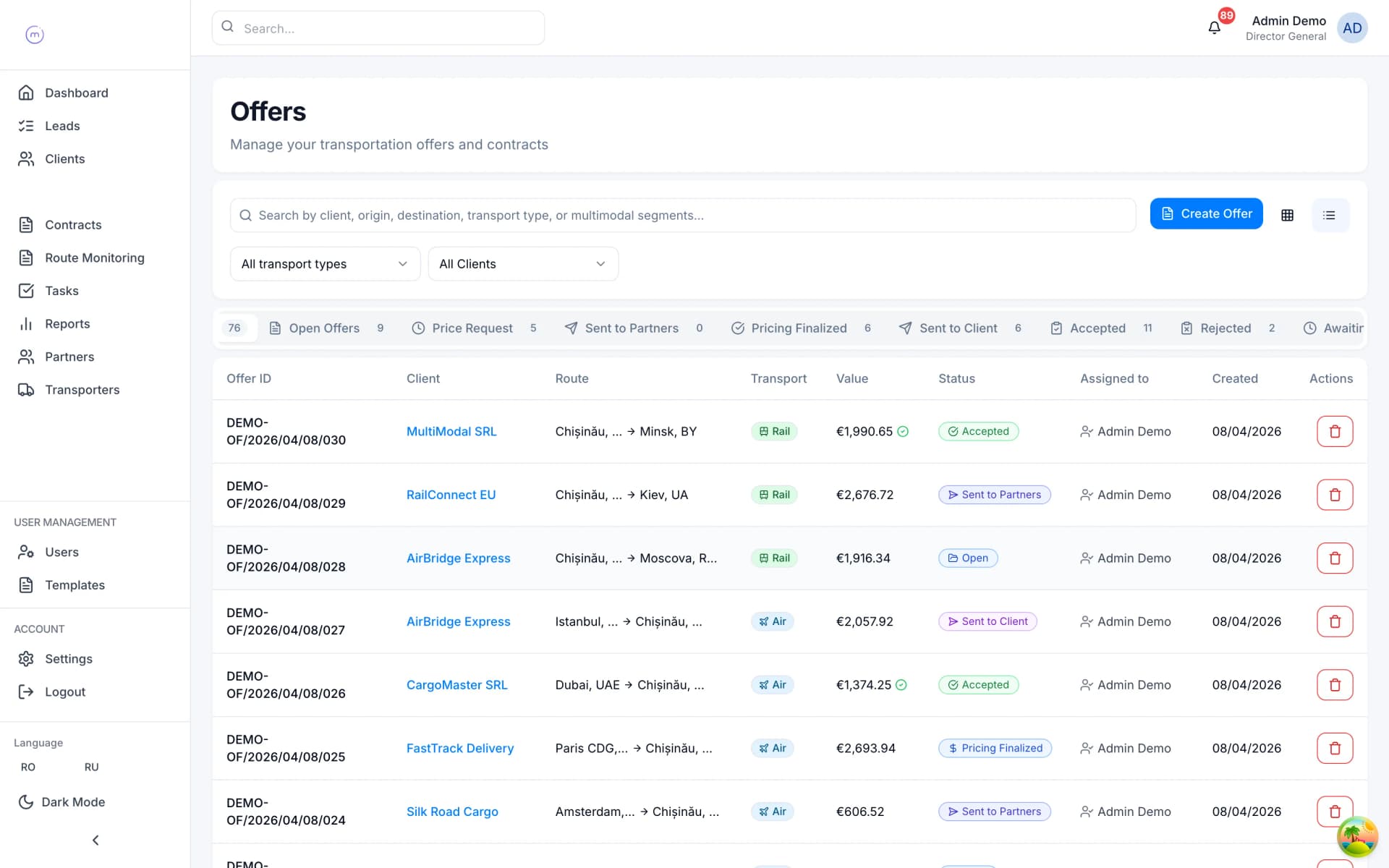
Zero automation — every follow-up email, every status update, every contract is manual. A CRM auto-generates contracts from accepted offers, sends notifications on status changes and links emails to deals automatically.
No audit trail — if a price changes, there is no record of who changed it, when, or what the previous value was. This is a compliance problem in regulated cross-border trade.
Reporting requires a data scientist — building a 'revenue by client by quarter' report in Excel means pivot tables, manual data cleaning and an hour of work. In a CRM, it is one click.
Version control is non-existent — by Friday, there are three copies of the master spreadsheet: the one on the shared drive, the one Maria downloaded on Monday and updated locally, and the one the operations manager emailed to the CEO. Which version has the correct carrier rates for the Istanbul lane? Nobody knows without opening all three and comparing cell by cell.
Onboarding is fragile — when a new sales rep joins, they inherit a spreadsheet with 47 tabs, colour-coded statuses that only the previous rep understood, and formulas that break if you insert a row in the wrong place. Training takes weeks instead of days, and the first month is spent learning the spreadsheet rather than learning the business.
The tipping point: when to switch
Based on patterns across hundreds of freight forwarding companies, the tipping point typically hits when three conditions converge:
- Volume exceeds 100 offers per month — at this point, the time spent maintaining the spreadsheet (formatting, copying, fixing formulas, consolidating files) exceeds the time it would take to learn a new tool.
- More than 3 people need to see the same data — Excel is a single-user tool pretending to be multi-user. Real-time collaboration on pricing data, carrier status and offer tracking requires a platform built for it.
- You start losing money you cannot trace — a missed follow-up that cost a deal, a pricing error that wiped margin, a carrier that was supposed to be blacklisted but nobody updated the spreadsheet. When the cost of errors exceeds the cost of a CRM subscription, the decision makes itself.
Most mid-market forwarders hit this point between 50 and 200 employees. But we have seen 15-person companies switch early because they valued data quality from day one — and they grew faster as a result.
A useful diagnostic: if your team spends more than 30 minutes per day maintaining spreadsheets (formatting, fixing, consolidating, emailing updated versions), the operational overhead has already exceeded the cost of a CRM. Track it for one week and the numbers will make the case for you.
What a freight CRM actually changes
The concrete differences, not the marketing promises:
Offer creation drops from 15 minutes to 2 minutes — pre-populated client data, templated pricing, automatic reference numbering and one-click partner fan-out eliminate the manual assembly work.
Margin is visible before the offer leaves — the system calculates net margin per offer in real time, using live exchange rates. No more 'we will figure out profit at month-end'.
Contracts generate themselves — when the client accepts the offer, both the client contract and the transporter contract are auto-generated from templates. Variables are populated. Both signed copies are tracked.
Emails link to deals automatically — replies to a quote land on the deal record via conversation ID matching. No more searching your inbox for 'that email about the Rotterdam shipment'.
The carrier registry is shared and live — every team member sees the same transporter database with capabilities, zones, blacklist status and performance history. When someone blacklists a carrier at 10am, no one sends them a quote at 11am.
Reporting is instant — profit per client, conversion per sales rep, overdue payments, margin by route. One click, real time, exportable.
Team continuity is protected — when a sales rep goes on holiday or leaves the company, all their client relationships, offer history, carrier contacts and pending deals remain in the system. The colleague who takes over can see every conversation, every quote and every open item without a handoff meeting. In Excel-based operations, knowledge walks out the door with the person who maintained the spreadsheet.
Scalability is built in — a CRM that works for 5 users works for 50 users. The same workflows, the same data model, the same reporting. You do not need to rebuild your processes when the team doubles, because the system was designed for collaboration from day one.
The migration path: how to switch without losing data
The biggest fear is losing historical data. A good migration plan addresses this:
- Export your existing spreadsheets to CSV format — client lists, partner lists, pricing history, offer logs.
- Map the columns — most freight CRMs have import wizards that let you map your Excel columns to system fields. Client name, email, phone, address, capabilities — standard fields.
- Run both systems in parallel for 2-4 weeks — new offers go into the CRM, but keep the spreadsheet alive for reference on historical deals.
- Train the team on the actual workflow — not a generic demo, but 'here is how you create the same offer you made yesterday, but in the new system'.
- Set a cutoff date — after the parallel period, the spreadsheet becomes read-only. All new work goes through the CRM.
The typical migration takes 1-2 weeks for a 10-person team, including data import and training. The ROI — measured in time saved on offer creation, errors avoided on pricing and follow-ups not missed — typically pays back the first month.
One common concern during migration is data quality. Most forwarders discover that their spreadsheets contain duplicate client entries, inconsistent company names (the same client listed as 'Maersk', 'A.P. Moller-Maersk' and 'MAERSK LINE') and outdated contact information. The migration process is actually an opportunity to clean this data once — establishing a consistent, accurate database that serves the team going forward. Budget an extra day for data cleaning during import; the long-term payoff in search accuracy and reporting reliability is substantial.
The real cost of not switching
We often hear 'we cannot afford a CRM right now'. But consider the hidden cost of staying on Excel:
If your team creates 200 offers per month and each offer takes 12 extra minutes in Excel vs a CRM, that is 40 hours per month of wasted labour — roughly the cost of half a full-time employee.
If 2% of your offers have a pricing error (a conservative estimate for manual spreadsheets), and your average deal value is EUR 3,000, that is EUR 12,000 per month in margin at risk.
If you lose one deal per week because a follow-up was missed (it was in someone's personal spreadsheet and they were on holiday), that is 50+ lost deals per year.
The CRM subscription is the smallest number in this equation.
There is also an opportunity cost that never appears on a spreadsheet: the deals your team did not pursue because they were too busy maintaining the one they already had. When offer creation takes 15 minutes instead of 2, your team creates fewer offers per day. Fewer offers means fewer conversions. Fewer conversions means slower growth. The spreadsheet is not just costing you money — it is capping your revenue. Ready to see the difference? Book a demo and run your own scenario.