
Automated contract generation for freight forwarders
In freight forwarding, the contract is not the end of the sales process — it is the beginning of the operational process. Every minute spent manually creating contracts is a minute taken from moving freight. Here is how automated contract generation works and why it changes the game for forwarders.
Victor Diaconu
Co-founder & CTO
The problem: manual contract creation in freight forwarding
A typical freight forwarder creates 100-500 contracts per month. Each contract requires:
- Route details (origin, destination, transport mode, cargo description)
- Pricing (sell rate to client, buy rate from carrier, currency, payment terms)
- Party details (client company name, address, registration number, contact)
- Carrier details (transporter company, driver name, truck plate, phone)
- Reference numbers (offer reference, contract number, CMR reference)
- Legal terms (Incoterms, liability, jurisdiction, dispute resolution)
- Document attachments (loading instructions, special requirements)
In the manual process, someone on the operations team opens a Word template, copies the details from the accepted offer (which lives in another system — email, spreadsheet, CRM), types in the carrier information, adjusts the legal terms for this specific route, generates a PDF, and sends it for signature. Then they do the same for the transporter's contract.
Time per contract: 15-30 minutes. At 300 contracts per month, that is 75-150 hours of pure data re-entry. One full-time employee doing nothing but copying data from one system into another.
Beyond the time cost, there is a quality cost. Manual contract creation introduces human error at every step. A mistyped carrier phone number means the driver cannot be reached on loading day. A wrong delivery address adds a re-delivery charge. An outdated Incoterm clause creates legal ambiguity. These are not hypothetical scenarios — they happen weekly in forwarding companies that rely on manual contract assembly. Each error requires time to detect, time to correct and often money to resolve.
How automated contract generation works
The core principle is simple: the contract should be a downstream output of the offer, not a separate document created from scratch.
When a freight platform has a unified data model — where the offer contains the client, the route, the pricing, the carrier and the terms — generating a contract is just applying a template to that data.
Step 1: Template configuration — the company sets up contract templates (HTML-based with variable placeholders). A typical forwarder needs 4-7 templates: client road contract, transporter road contract, international forwarding contract, sea freight contract, air freight contract, quote email, contract email.
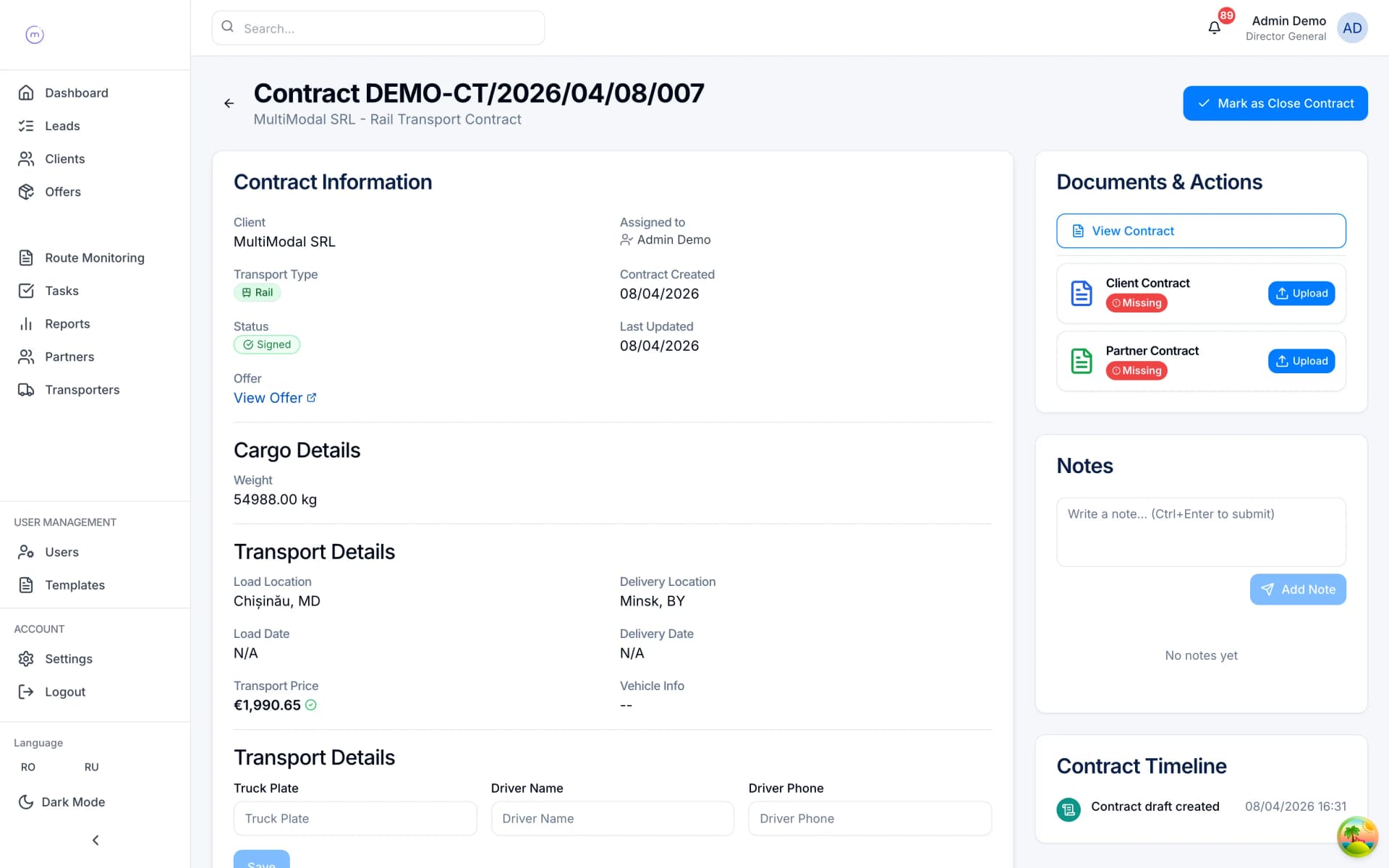
Step 2: Variable mapping — each placeholder in the template maps to a field in the system. {{client.name}}, {{offer.sellPrice}}, {{carrier.truckPlate}}, {{route.origin}} — these are populated automatically from the deal record.
Step 3: Trigger — when the offer status changes to 'Accepted', the system generates both contracts. The user reviews the generated documents, adjusts if needed, and sends for signature.
Step 4: Signature tracking — when signed copies are uploaded, the system marks the contract as signed, notifies the operations team, and the shipment monitoring phase begins.
The result: contract creation drops from 25 minutes to under 2 minutes. The contract is guaranteed to contain the correct pricing (it came from the offer). The carrier details are guaranteed to be current (they came from the carrier registry). And every contract is stored against the deal record for immediate retrieval.
Dual-party contracts: client + transporter in one pass
A freight deal always involves at least two contracts: one with the client (who pays the forwarder) and one with the carrier (whom the forwarder pays). These two contracts must be consistent — the route, cargo and delivery terms should match, while the pricing reflects the buy and sell sides of the deal.
Automated dual-party generation means both contracts are created from the same accepted offer in a single action. The system uses the client template for the client contract and the transporter template for the carrier contract, sharing the common data (route, cargo, dates) while using the appropriate pricing and terms for each party.
The reference numbers are linked: the transporter contract references the client contract number and vice versa. This makes audit easy — given any contract, you can trace back to the offer, the partner quotes, the other party's contract and all associated documents.
For multimodal shipments with multiple carriers (one per leg), the system generates one client contract and multiple transporter contracts — one per carrier. All linked to the same offer. See our multimodal freight quoting guide for how the offer structure feeds into this.
This linked structure also simplifies dispute resolution. When a client questions a charge or a carrier contests a rate, you open the offer and see the complete chain: the original partner quotes, the accepted rates, the client contract, the transporter contract and every document exchanged. There is no ambiguity about what was agreed, by whom, and when — because every element traces back to a single source record.
Template types for freight forwarders
Based on the most common patterns across European freight forwarders:
- Client truck contract — standard road freight contract between the forwarder and the client. Includes route, FTL/LTL details, pricing in EUR, CMR convention terms, delivery milestones.
- Transporter truck contract — the carrier-facing version. Includes buy rate, loading instructions, truck and driver requirements, payment terms.
- International forwarding contract — for multimodal or cross-border shipments. More complex terms: Incoterms, customs clearance responsibilities, multi-leg pricing, transit insurance.
- Sea freight contract — specific to FCL/LCL ocean shipments. Includes container type, shipping line, port pair, bill of lading references, demurrage terms.
- Offer email — a formatted email template that presents the quote to the client. Includes pricing summary, validity period, terms summary, and a call-to-action to accept.
- Quote request email — sent to carriers when fanning out for competitive rates. Includes shipment details, required capacity, expected timeline.
- Contract email — sent alongside the generated contract PDF. Includes key terms summary and instructions for signing and returning.
Each template is HTML-based with a variable system built into the contract management module. Non-technical users can edit the templates through a WYSIWYG editor, changing layout, branding, legal language and terms without touching code.
Template versioning is equally important. When your legal team updates the liability clause, you need the new language to apply to all future contracts while preserving the original language on historical contracts. A good template system maintains version history, so you can always see which template version was used for any given contract — critical for dispute resolution and regulatory audits.
Document lifecycle: from contract to compliance
Generating the contract is step one. The full document lifecycle includes:
Contract generation — auto-created from accepted offer with all variables populated.
Signature collection — both signed copies (client and transporter) are uploaded against the contract record. The system tracks which party has signed and which is pending.
Operational documents — as the shipment progresses, documents are added: CMR (consignment note), commercial invoice, packing list, delivery note, proof of delivery (POD), customs declarations.
Completeness tracking — the system monitors which documents are present and which are missing. A 'fully documented' flag is calculated automatically based on configurable rules (e.g., a road freight contract requires CMR + invoice + POD).
Completion date — auto-calculated as the date when the last required document was uploaded. This eliminates the manual task of checking completeness and recording the date.
Audit trail — every document upload, status change and pricing edit is logged with user, timestamp and diff. This is essential for compliance in cross-border freight, where regulators may audit any deal within the retention period.
Archival — completed deals (paid, all documents present, trip closed) are archived but remain fully searchable and retrievable. The system retains them for the configured retention period (typically 5-7 years for financial records, as required by EU tax law and local fiscal regulations).
ROI: what automated contracts save
The numbers from real implementations:
Time savings — at 300 contracts/month, moving from 25 min/contract to 2 min/contract saves 115 hours/month. At a fully loaded cost of EUR 20/hour for an operations coordinator, that is EUR 2,300/month.
Error reduction — manual contracts have a 3-5% error rate (wrong price, wrong carrier, wrong reference). Automated contracts have near-zero data errors because the data comes from the source of truth.
Faster deal closure — when the contract is ready 2 minutes after the offer is accepted (instead of waiting until tomorrow morning when the ops coordinator gets to it), the carrier is booked sooner, the client is happier, and the risk of the deal falling through is lower.
Compliance confidence — every contract is generated from a reviewed template with correct legal terms. There is no risk of an ops coordinator using an outdated template or forgetting to update the Incoterms.
Auditability — linked references between offer, client contract, transporter contract and documents make regulatory audit straightforward. The auditor can trace any deal from start to finish in one system.
The CRM subscription cost is typically paid back in the first month from time savings alone. The error reduction and compliance benefits are additional.
There is also a scalability benefit that becomes apparent as the company grows. A 10-person team creating 100 contracts per month can manage manual processes, even if inefficiently. A 30-person team creating 400 contracts per month cannot — the manual process either requires hiring additional administrative staff or accepting longer turnaround times that frustrate clients and carriers. Automated contract generation scales linearly: whether you process 100 or 1,000 contracts per month, the per-contract effort remains the same — a quick review and a click to send. Growth does not require proportional headcount increases in operations, which directly improves your cost structure and margins. Contract automation is one of the core modules we describe in what is freight forwarding software.